Tina Donati is the Head of Marketing at Simple Bundles and has spent the past 7+ years helping Shopify brands streamline their tech stack and unlock growth through smarter product bundling, better UX, and cleaner ops.
Shopify tips
How to choose between a discount app and a bundling app
Learn how to choose between a discount app and a bundling app based on what you're trying to build. Plus, see how bundle pricing can work alongside Shopify discount codes, how to avoid accidental double-discounting, and why fulfillment should be part of the decision.
Tina Donati is the Head of Marketing at Simple Bundles and has spent the past 7+ years helping Shopify brands streamline their tech stack and unlock growth through smarter product bundling, better UX, and cleaner ops.
Discounts and bundles can look similar on the storefront. But behind the scenes, discount apps and bundling apps solve very different problems.
So, how do you choose between a discount app and a bundling app?
The answer depends on what you’re trying to build: a pricing rule or a product experience. Before choosing, separate the offer into two questions:
Is this a new product experience?
Or is this a pricing rule?
Let’s review your choices.
Product logic vs. discount logic
A bundling app is the better fit when the offer needs to behave like a product. That includes kits, sets, multipacks, build-your-own bundles, mix-and-match boxes, subscription bundles, or any offer where inventory, fulfillment, and reporting need to understand which component SKUs were included.
A discount app is the better fit when the offer is mainly a pricing rule. That includes “buy 3, save 15%,” “spend $100, get 10% off,” “buy from this collection and get a discount,” or limited-time promotions where the customer is still purchasing individual products.
The easiest way to decide is this:
If the merchant is asking, “What items are inside this offer, and how should they be picked, packed, tracked, and restocked?” they probably need bundling logic.
If the merchant is asking, “When should this cart qualify for a lower price?” they probably need discount logic.
How do I choose between a simple discount app and a full-featured bundling app?
A simple discount app works well for a promotion like “Buy any 3 candles, save 15%.” The customer is still adding individual candles to the cart. The app’s job is to recognize the cart condition and apply the right discount.
A full-featured bundling app is a better fit for something like “Build Your Own Candle Gift Box.” In that case, the merchant may want a dedicated bundle product page, a guided selection experience, component-level inventory sync, and a clean breakdown for fulfillment.
The discount is only one part of the offer. The bigger requirement is making the bundle work as a sellable product.
Choose a discount app when…
Choose a bundling app when…
The customer is buying separate products.
The customer is buying a curated kit, set, box, or bundle product.
The main goal is to reduce the price.
The main goal is to package products together.
Fulfillment does not need special handling.
Fulfillment needs to know the component SKUs.
Inventory is already clear because each item is in the cart.
Inventory needs to sync against child products/components.
The offer is temporary or campaign-based.
The offer is part of your product catalog.
You want “Buy 3, save 15%.”
You want “Build your own 3-piece skincare routine.”
You are solving promo logic.
You are solving product, inventory, and fulfillment logic.
How can I build product bundles that still work with discount codes and Shopify’s native promotions?
Bundle pricing and discount codes should be planned as separate layers.
Think of it like this:
Layer 1: the bundle itself
Layer 2: Shopify discount codes or automatic promotions
Layer 3: combination rules that decide what can stack
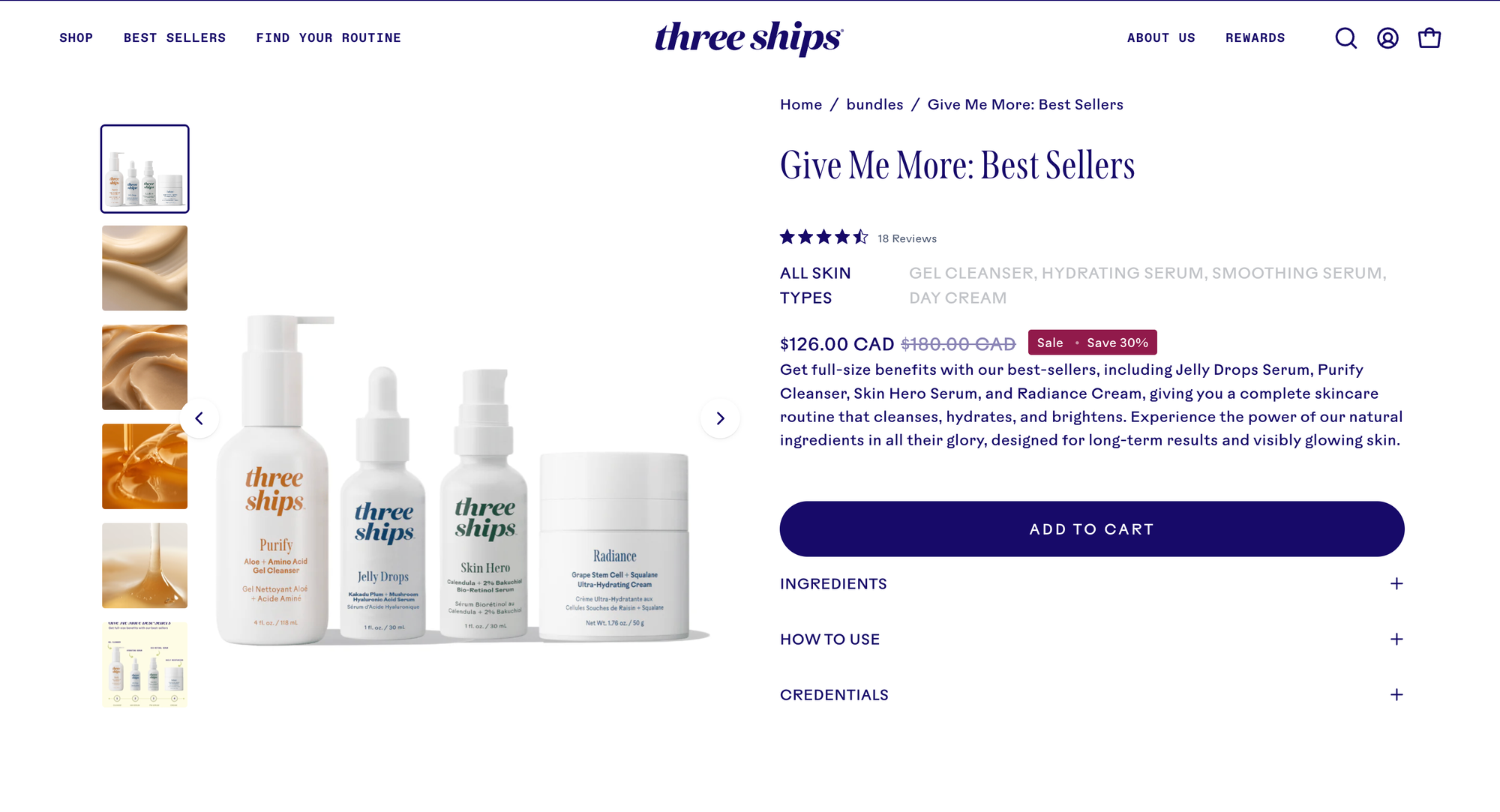
Product-level bundled pricing is the price of the bundle itself. For example, a skincare brand might sell a cleanser, serum, retinol, and moisturizer together as a $120 routine, even though the individual products would cost $180 if purchased separately. That savings is built into the bundle offer.
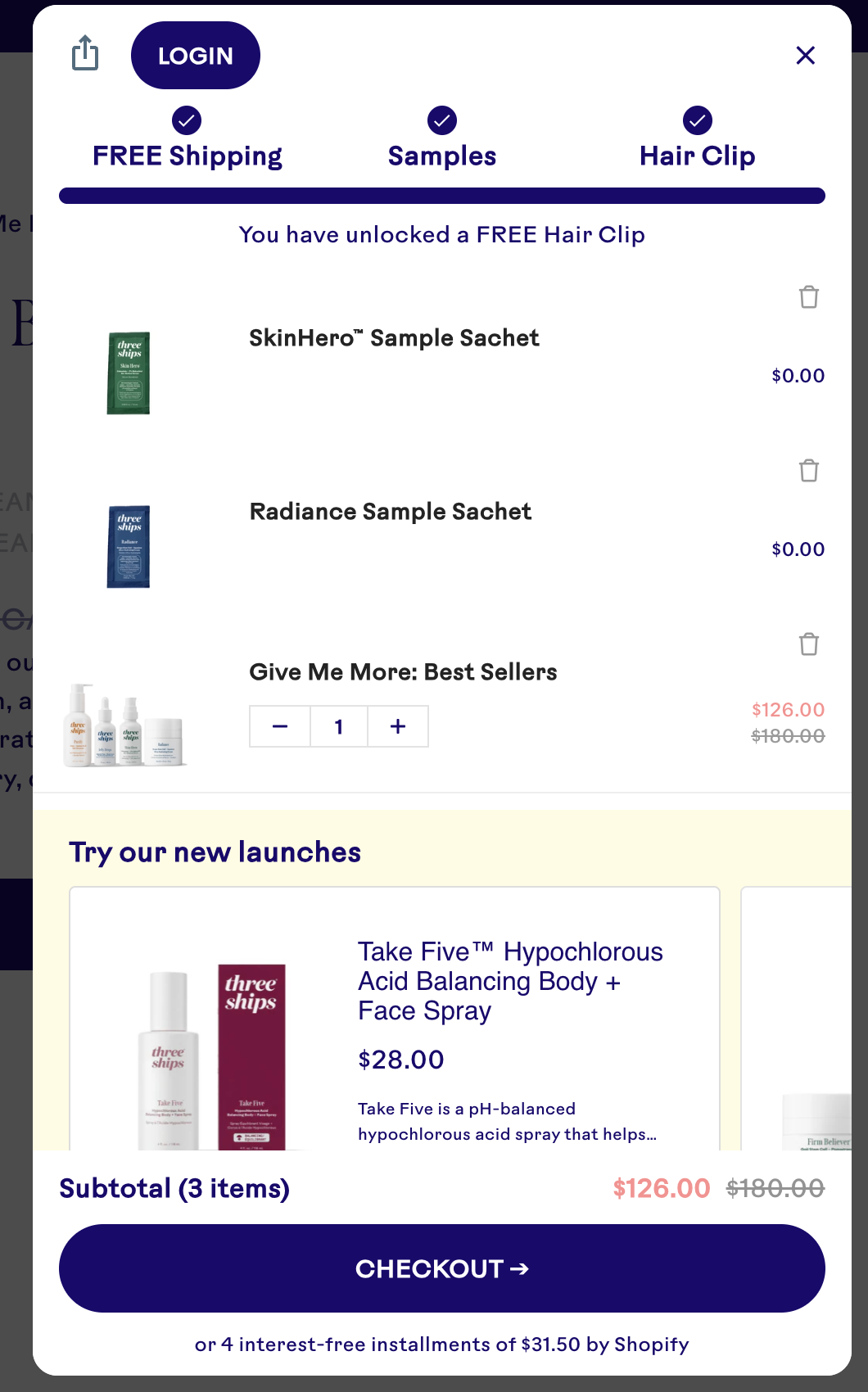
Cart-level promotions happen after the customer adds products to the cart. For example, a customer might enter a welcome code for 10% off, qualify for free shipping, or unlock a free gifts after spending $95. You can see Three Ships applying free shipping and free gifts in the scenario below:
The problem starts when these two layers are not separated (the bundles versus discounts).
If the bundle already includes a built-in discount, and then a sitewide discount code also applies on top of it, the customer may receive more savings than intended. Sometimes that is fine. You may intentionally allow a free shipping code or loyalty reward to stack with a bundle. But in other cases, it can quietly eat into margin.
The safest setup is to define the bundle price first, then decide which Shopify discounts are allowed to combine with it. For example, a merchant might allow a free shipping code to stack with a bundle, but prevent an additional 20% product discount from applying to the same bundled items.
This is where a product-first bundling app and a rule-first discount app can work together.
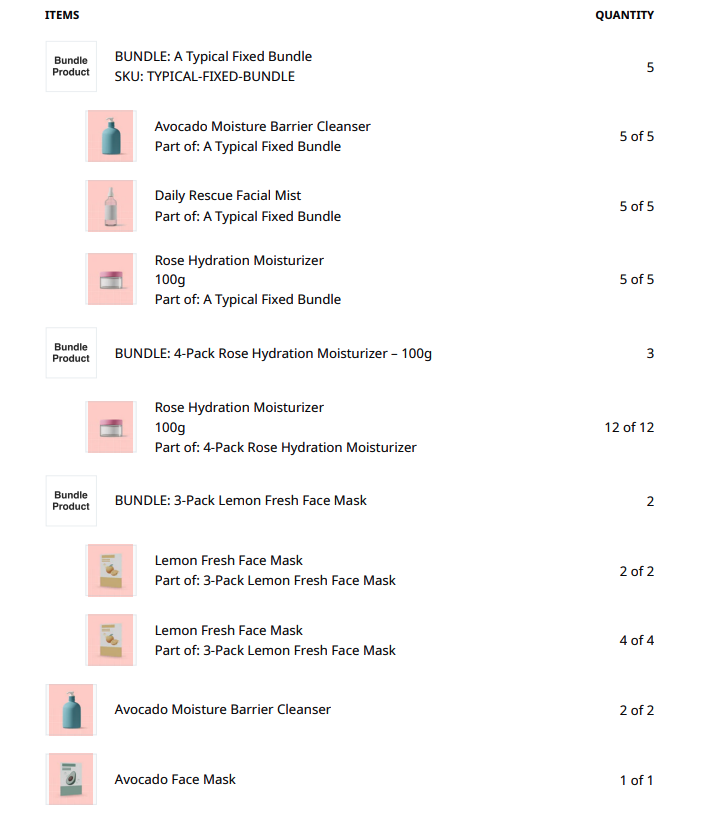
A bundling app handles the bundle structure: what the parent product is, which child SKUs are included, how inventory syncs, and how the order should break down.
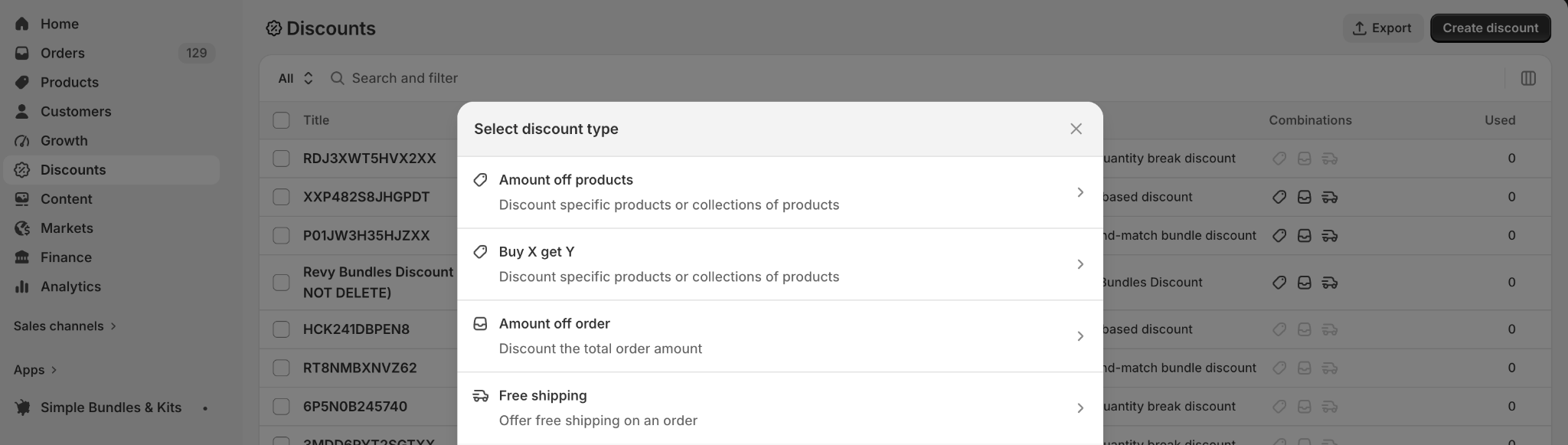
A discount app handles the promotion layer: who qualifies, which products or collections are eligible, and whether the discount should combine with other offers.
How Simple Bundles works with Shopify discounts
Simple Bundles is designed to play nicely with Shopify's discount system. Here's the breakdown:
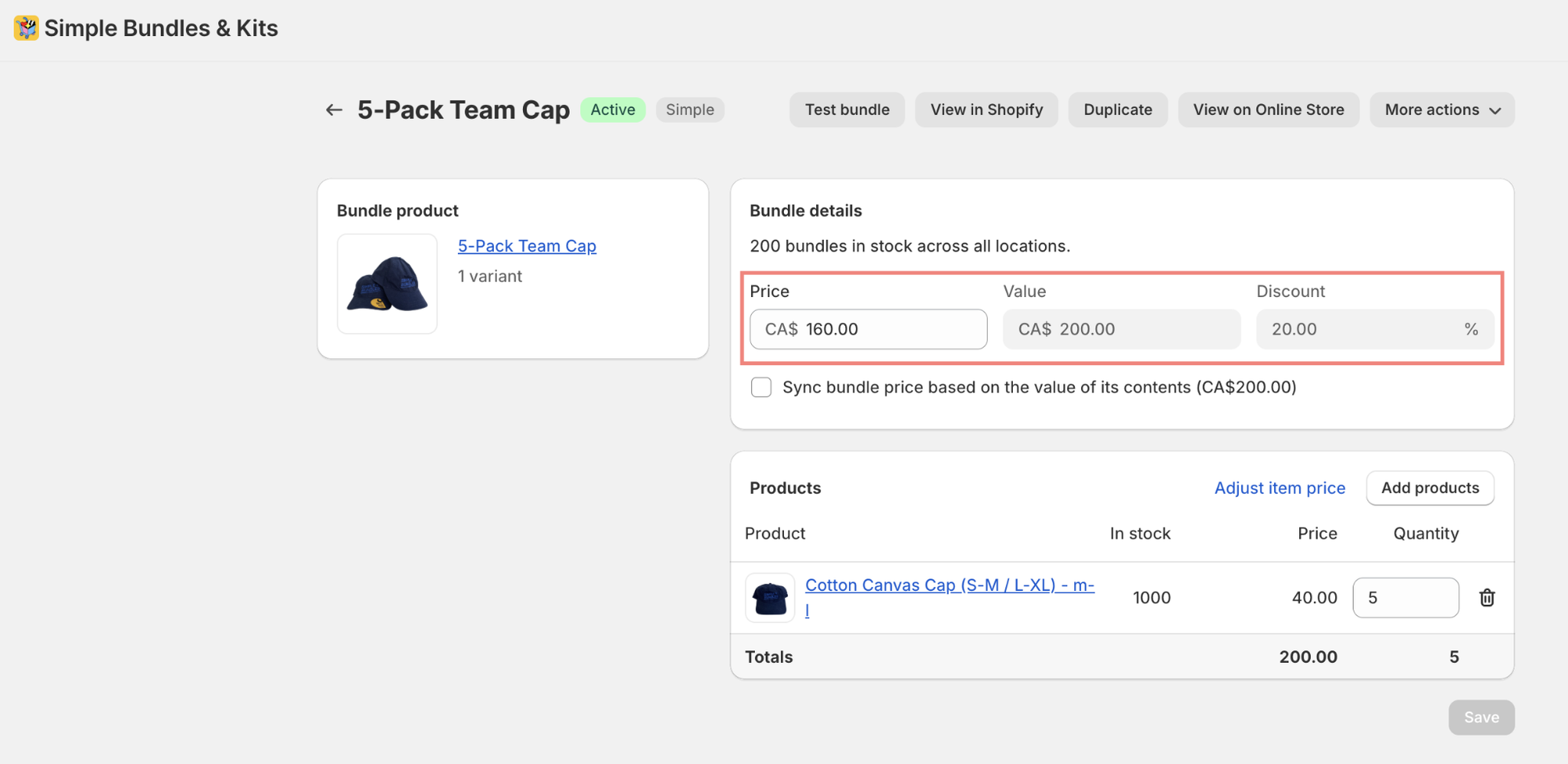
When you set a discounted price on a bundle in SB, the app automatically updates the Shopify product's Price and Compare at price fields. No separate Shopify discount is needed — the bundle price is the discount. Customers see the strikethrough "was / now" on the product page.
These stack on top of the bundle-level discount. Both apply simultaneously at checkout — customers see the bundle savings and the additional Shopify promo.
How Shopify discounts are distributed on bundles
In Simple Bundles, when a Shopify discount is applied to a bundle, the discount is distributed proportionally across the individual component products based on weighted price:
Percentage discounts — Each component gets the same % off, proportional to its value
Fixed amount discounts — The dollar amount is split across components based on each item's relative share of the total bundle price
This means taxes are calculated correctly on each individual component after the discount is applied.
What works
Simple Bundles supports:
Shopify discount codes, including percentage and fixed amount discounts
Shopify automatic discounts
Bundle-level price savings with compare-at pricing
Dynamic pricing within bundles, including free gifts and custom item pricing
BOGO-style bundles where certain items are priced at $0
Transparent discount display at checkout
However, one key limitation to flag: Quantity-based discount thresholds can be tricky. Shopify's discount engine evaluates the cart before the Cart Transform API expands the bundle into its individual components. So a bundle containing 4 items counts as 1 item toward quantity thresholds.
Example: A "buy 12 items, get free shipping" rule + three 4-item bundles (12 items total) = Shopify only sees 3 items, so the rule won't trigger.
Instead, use spend-based thresholds (e.g. "free shipping on orders over $X") instead of item-count thresholds. These are evaluated against the cart total and aren't affected by this limitation.
How to avoid double-discounting when stacking bundle pricing with Shopify discount codes
Double-discounting usually happens when the bundle already includes a built-in savings, then another product or order discount applies on top of it unintentionally.
The easiest way to avoid double-discounting is to decide where the savings should live.
Savings can live in the bundle price.
Savings can live in a Shopify discount code.
Savings can live in an automatic promotion.
But they shouldn’t live everywhere at once unless that’s intentional. Before launching a bundle promotion, ask yourself:
Is the bundle price already discounted?
Should discount codes apply to this bundle?
Should only certain discounts apply, such as free shipping or loyalty rewards?
Should product-level discounts be blocked, but order-level discounts allowed?
Should the bundle be excluded from sitewide sales?
The goal is to make stacking intentional and only available in certain scenarios.
Why fulfillment should be part of the decision
One of the biggest differences between a discount app and a bundling app shows up after checkout.
Discount logic can make an offer cheaper.
Bundle logic makes the offer operationally possible.
A discount app can change the price of products in the cart, but it doesn’t usually change how those products are structured for inventory, fulfillment, or reporting. That works well when the customer is buying individual products and simply receiving a discount.
But if the customer is buying a kit, gift set, multipack, build-your-own box, or curated bundle, the backend needs more information than the discount amount.
Your fulfillment team needs to know which individual products to pick and pack. Your inventory system needs to know which SKUs to deduct. Your 3PL, WMS, or ERP may need the component items to appear clearly in the order. Your reporting may need to show both the bundle sale and the products inside the bundle.
For example, a “Complete Skincare Routine” might appear to the customer as one bundle product. But the warehouse still needs to pick the cleanser, serum, and moisturizer.
If the bundle is only treated as a discount, Shopify may not have the structure needed to properly connect that parent offer to the child SKUs inside it. The questions you need to answer are:
Did inventory update correctly?
Can the packing slip or pick list show the right products?
Can the 3PL or warehouse understand what needs to ship?
Can the merchant report on bundle sales and component sales?
This is why fulfillment should be part of the app decision. If the offer only needs pricing logic, a discount app may be enough. If the offer needs product, inventory, and fulfillment logic, a bundling app is usually the better fit.
So, what’s the best Shopify app for bundles and discounts?
The best app depends on whether you are trying to create a product or apply a promotion. Two apps worth considering are Simple Bundles and Simple Discounts.
Simple Bundles answers: “How do I sell multiple SKUs as one bundle product without breaking inventory, fulfillment, or reporting?”
Simple Discounts answers: “How do I automatically discount products when the cart meets a rule?”
Here’s a more robust breakdown to help you choose:
Area
Simple Bundles
Simple Discounts
Main purpose
Create actual bundle products, kits, multipacks, BYOB, mix-and-match bundles, etc.
Create discount rules like mix-and-match discounts, tiered discounts, volume discounts, and quantity breaks.
What you configure
A bundle product + the component/child SKUs inside it.
A discount condition + the products/collections/customers that qualify.
Shopify product setup
Usually creates or uses a parent bundle product in Shopify.
Does not need to create a new product. It applies discounts to existing products in cart/checkout.
Backend logic
Maps the bundle parent to child/component items for inventory, fulfillment, and reporting.
Applies pricing logic when the cart matches the rule.
Checkout/order behavior
Depending on setup, the customer can buy a bundle as one offer while Shopify/order operations can still see the component items.
Customer buys individual products, and Shopify applies a discount when the rule is met.
Inventory
Bundle availability is based on child SKU inventory; inventory syncs against components. Simple Bundles docs describe bundle inventory as determined by the availability of individual bundle items.
Inventory remains tied to the individual products being purchased. The app listing positions it around discounts with accurate inventory/no theme code.
Fulfillment
Better when the warehouse/3PL needs a clean breakdown of what to pick and pack. Freshly describes Simple Bundles as breaking bundles into individual SKUs for real-time inventory syncing and fulfillment.
Better when fulfillment is already obvious because the order contains the individual products.
Shopify tech layer
Uses bundle/cart transform-type behavior, product configuration, and bundle mappings. The Shopify App Store listing notes access to Shopify Functions and cart transforms.
Uses Shopify discount logic/functions to apply automatic or code-based discounts. Shopify’s developer docs describe Shopify Functions as a way to extend checkout discount functionality.
Best for
“Sell this as a bundle/kit/product.”
“Discount these items when the cart meets a condition.”
Final verdict
Discount apps and bundling apps can both help merchants create better offers, but they are not interchangeable.
Use a discount app when the customer is still buying individual products and the main goal is to apply a pricing rule.
Use a bundling app when the offer needs to behave like a real product, with component SKUs, inventory syncing, fulfillment logic, and reporting built in.
The strongest setup often uses both layers intentionally: bundle logic to define what the customer is buying, and discount logic to control which promotions can apply on top.
That way, you can create offers that look good on the storefront, work with Shopify’s native promotions, and still make sense after the order reaches your warehouse.
Build a bundle in under 5 minutes
Over 25,000 Shopify merchants use Simple Bundles to sell more per order.
Learn why bundle analytics are harder to track than regular product analytics in Shopify and the key metrics brands should monitor. Discover practical ways to track performance through SKU-matching exports, built-in bundle analytics, AI-assisted analysis, Bundle Magic, and promo code attribution.
Stocky shuts down permanently on August 31, 2026. If you sell perishables, track batches or lots, manage expiry dates, or sell multi-SKU bundles, there are real gaps you need to plan around before the deadline.
Off-road and overlanding customers are buying complete upgrades for their rigs. This article explains why kit-based selling dramatically increases AOV for Shopify stores by packaging compatible components into pre-built kits or bundles.