Basil is the Co-Founder and CTO of Simple Bundles, where he leads product strategy and development. With deep experience building scalable systems for merchants, he specializes in the technical and operational challenges for back-office operations.
Bundle tutorials
How to send bundle order data to your analytics, ERP, or custom systems
The bundle relationships exist. Now your external systems can finally see them.
Basil is the Co-Founder and CTO of Simple Bundles, where he leads product strategy and development. With deep experience building scalable systems for merchants, he specializes in the technical and operational challenges for back-office operations.
Your analytics dashboard shows orders coming in. Revenue looks good. But when you try to understand which bundles are actually driving that revenue? You're staring at line items that tell you almost nothing.
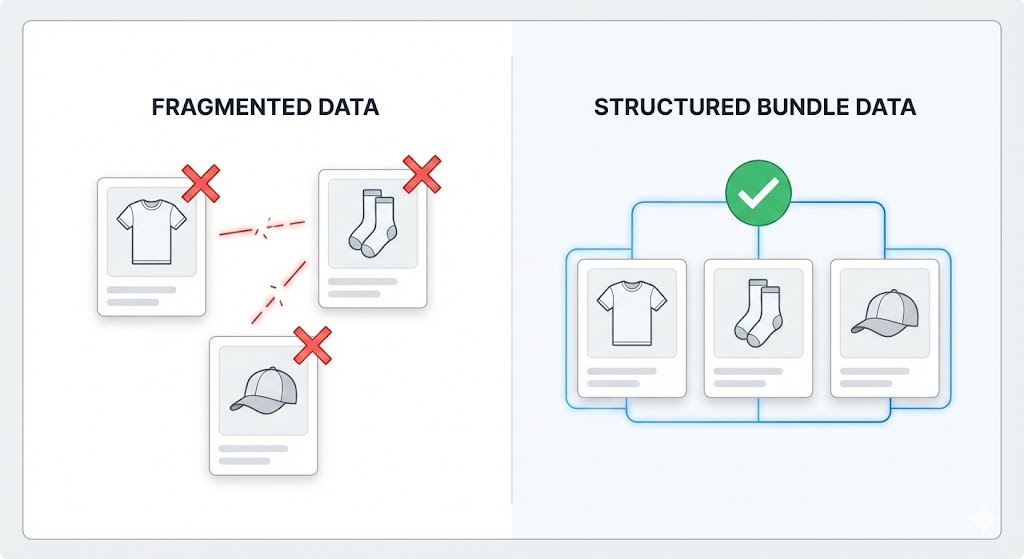
That's because Shopify treats bundle components as individual line items. Your external systems see "Blue T-Shirt, Size M" and "White Socks, 3-Pack" as separate purchases. They have no idea these items were sold together as the "Summer Basics Bundle" at a 15% discount.
That missing context makes your data incomplete. And incomplete data leads to messy processes and bad decisions.
Why bundle data gets trapped in the first place
Shopify wasn't built with bundles in mind. When a customer buys a bundle, the order record captures the individual products, quantities, and prices. What it doesn't capture is the relationship between those items.
This creates problems the moment you try to move order data anywhere else:
Analytics platforms can't calculate true bundle performance because they don't know which items were bundled
ERPs receive fragmented data that doesn't reflect how products were actually merchandised
Custom dashboards show individual SKU sales instead of bundle sales
3PL systems might not understand which items should ship together
The data exists in Simple Bundles. The challenge is getting it into a format your other systems can use.
Want bundle analytics without building custom integrations? Our partners at Report Toaster offer pre-built bundle reports that pull directly from Simple Bundles data. You get bundle sales over time, top-selling bundles, and customer segmentation without writing a single line of code. Simple Bundles customers get 20% off—just mention us when you sign up.
What bundle metafields actually give you
Simple Bundles can write bundle details directly to Shopify order metafields. This creates a structured JSON record attached to each order that contains everything your external systems need.
The metafield data includes:
Bundle identifiers showing which line items belong together
Product and variant details including titles and variant IDs
Pricing information for each component and the bundle as a whole
Bundle type so you know if it's a fixed bundle, mix-and-match, or another configuration
Line item groupings that preserve the bundle relationship
This is structured data in JSON format. That matters because JSON is the universal language for system integrations. Your analytics platform, inventory management or ERP, or custom webhook endpoint can parse it directly.
Here's what makes metafields different from other approaches: they contain the complete picture. Custom line item attributes can store some bundle info, but metafields give you pricing breakdowns, variant relationships, and bundle groupings all in one place.
How to enable bundle metafields
Getting this set up takes about 30 seconds:
Open the Simple Bundles app in your Shopify admin
Go to Settings
Scroll down to Advanced settings
Find the Shopify order tags section
Toggle on Enable bundle details in Shopify order metafields
Save your changes
That's it. From now on, every order containing bundles will have metafield data attached automatically.
One thing to note: this feature requires an Advanced or Plus plan. If you're on a lower tier, the toggle will appear grayed out.
Getting the data into external systems
Having metafield data attached to orders is step one. Step two is actually sending that data where you need it.
Using Shopify Flow for automated delivery
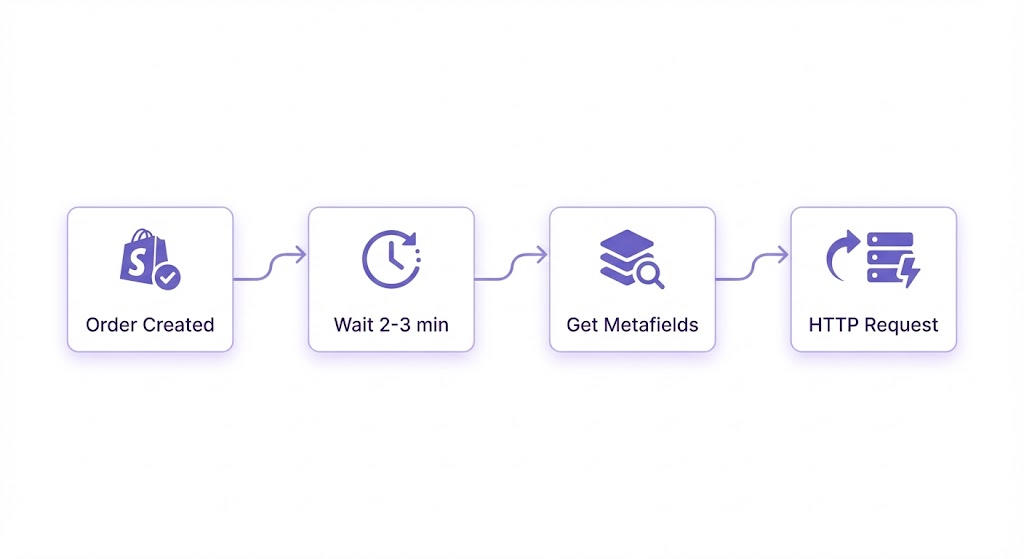
Shopify Flow is the most straightforward way to push bundle data to external endpoints. Here's a workflow that works:
Trigger: Order created
Condition: Order contains bundles (optional, but saves unnecessary API calls)
Action sequence:
Wait for 2-3 minutes. This delay is important because Simple Bundles needs a moment to process the order and write the metafield data. Without the delay, you might fetch the metafields before they exist.
Get order metafields using the order ID
Send HTTP request to your external endpoint with the metafield payload
The HTTP request can point to any endpoint that accepts JSON: your analytics platform's API, an ERP webhook, a Zapier catch hook, or a custom server you control.
What the data looks like
When you fetch the metafields, you'll get a JSON structure that includes array-based groupings. Each bundle in the order appears as its own object with all the component details nested inside.
This structure means you can:
Loop through bundles programmatically
Extract specific fields for your reporting needs
Transform the data to match your target system's schema
Other integration options
Flow isn't the only path. Depending on your tech stack, you might also consider:
Zapier or Make using a Shopify order trigger combined with a code step to fetch metafields
Custom app that listens for order webhooks and fetches metafield data via API
Direct API calls where you append /metafields.json to any Shopify order URL to retrieve the data
The Flow approach works well for most merchants because it requires no code and runs entirely within the Shopify ecosystem.
When metafields are the right choice
You might be wondering whether metafields are actually better than the alternatives. Here's how to think about it.
Use metafields when:
You need comprehensive bundle data including pricing and variant details
You're sending data to systems that can parse JSON
You want a single source of truth for bundle relationships
Your analytics needs to understand bundle performance as a unit, not just component sales
Consider custom line item attributes when:
You only need basic bundle identifiers
Your systems already read line item properties
You're doing simple tagging rather than full data export
For most merchants building serious integrations, metafields are the better choice. The data is richer, the format is more flexible, and you're not limited by line item property constraints.
Getting started
If you're already on an Advanced or Plus plan, turn on the metafield toggle today. It takes seconds, and you'll immediately start building a data history you can use later.
If you're not sure what system to send data to yet, that's fine. Enable metafields anyway. The data will accumulate on your orders, and you can build integrations when you're ready.
For most merchants, the Shopify Flow approach is the fastest path to value. Set up the workflow once, and every bundle order automatically pushes data to your endpoint.
The bundle relationships exist. Now your external systems can finally see them.
Build a bundle in under 5 minutes
Over 25,000 Shopify merchants use Simple Bundles to sell more per order.
Learn how to choose between a discount app and a bundling app based on what you're trying to build. Plus, see how bundle pricing can work alongside Shopify discount codes, how to avoid accidental double-discounting, and why fulfillment should be part of the decision.
Learn why bundle analytics are harder to track than regular product analytics in Shopify and the key metrics brands should monitor. Discover practical ways to track performance through SKU-matching exports, built-in bundle analytics, AI-assisted analysis, Bundle Magic, and promo code attribution.
Stocky shuts down permanently on August 31, 2026. If you sell perishables, track batches or lots, manage expiry dates, or sell multi-SKU bundles, there are real gaps you need to plan around before the deadline.